
Area Chart
Create sleek area charts in Notion to visualize trends, compare data ranges, and enhance project dashboards. Customize styles, axes, opacity, and more.
Inspect the widget before it reaches a live page.
Tune labels, data, colors, and layout from one editor.
Embed the finished specimen back into Notion.
Build with Area Chart
Area Chart Widget for Notion
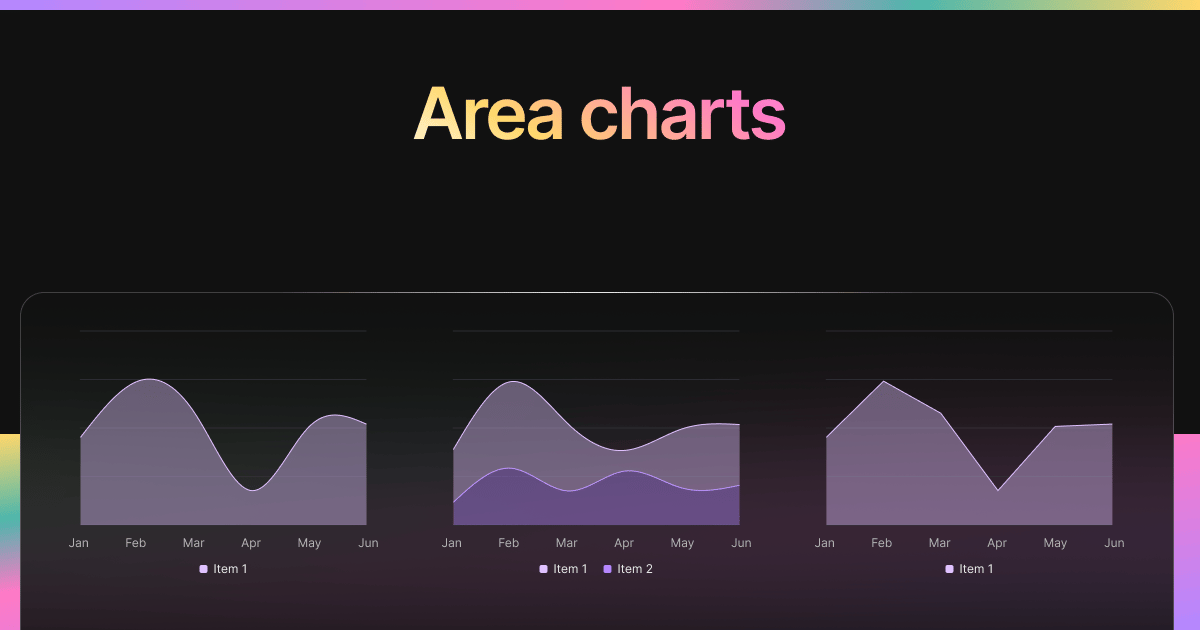
The Area Chart Widget brings soft visuals and powerful insights to your Notion workspace. It’s ideal for visualizing data over time while also showing the magnitude or “volume” of that data through filled color beneath the curve.
Think of it as a line chart with emotional depth — it not only tells you where things are going, but how much is happening.
Use Cases
- Habit Volume Tracking: Visualize how many times habits were completed weekly.
- Learning Hours: Track time studied across weeks or months with visual weight.
- Revenue Trends: Show rising/falling income while emphasizing cumulative totals.
- Energy/Mood Logs: Display mood or wellness check-ins with smooth, soft gradients.
- Productivity Journals: Add emotional nuance to focus, journaling, or flow metrics.
Area Chart Variants
Blocky includes a variety of area chart styles depending on your layout and use case:
1. Single-Area Chart
- One filled dataset across time.
- Simple, clean, and expressive.
2. Stacked Area
- Display multiple layers to compare different metrics.
- Shows total and individual values visually.
3. Gradient Fill
- Aesthetic chart that fades from dark to light.
- Great for dashboards with mood, emotion, or energy data.
4. Transparent Area
- For dark-mode or layered dashboards.
- Keeps focus on form without overpowering background content.
Each variant includes:
- Line overlays
- Hoverable tooltips
- Soft animation on render
- Optional grid and axis display
Customization Options
- Choose database + value/date fields
- Stack or overlay area sections
- Edit fill color, opacity, and border
- Toggle line visibility and markers
- Style font, label color, and spacing
- Control axis layout and background
Works beautifully in both light and dark Notion themes.
Auto-Sync with Notion
Like all Blocky widgets, the Area Chart updates live with your Notion database — no manual syncing required. It’s perfect for real-time journaling, habit tracking, or daily performance logs.
How to Embed in Notion
- Head to Blocky and select the Area Chart widget.
- Connect your Notion database with a date and value field.
- Choose fill style, colors, and line options.
- Copy the generated embed URL.
- Paste into your Notion page using
/embed.
A few seconds, and your page becomes visual.